
A great listing does more than appear in search results. It helps buyers quickly understand what makes a property worth their attention.
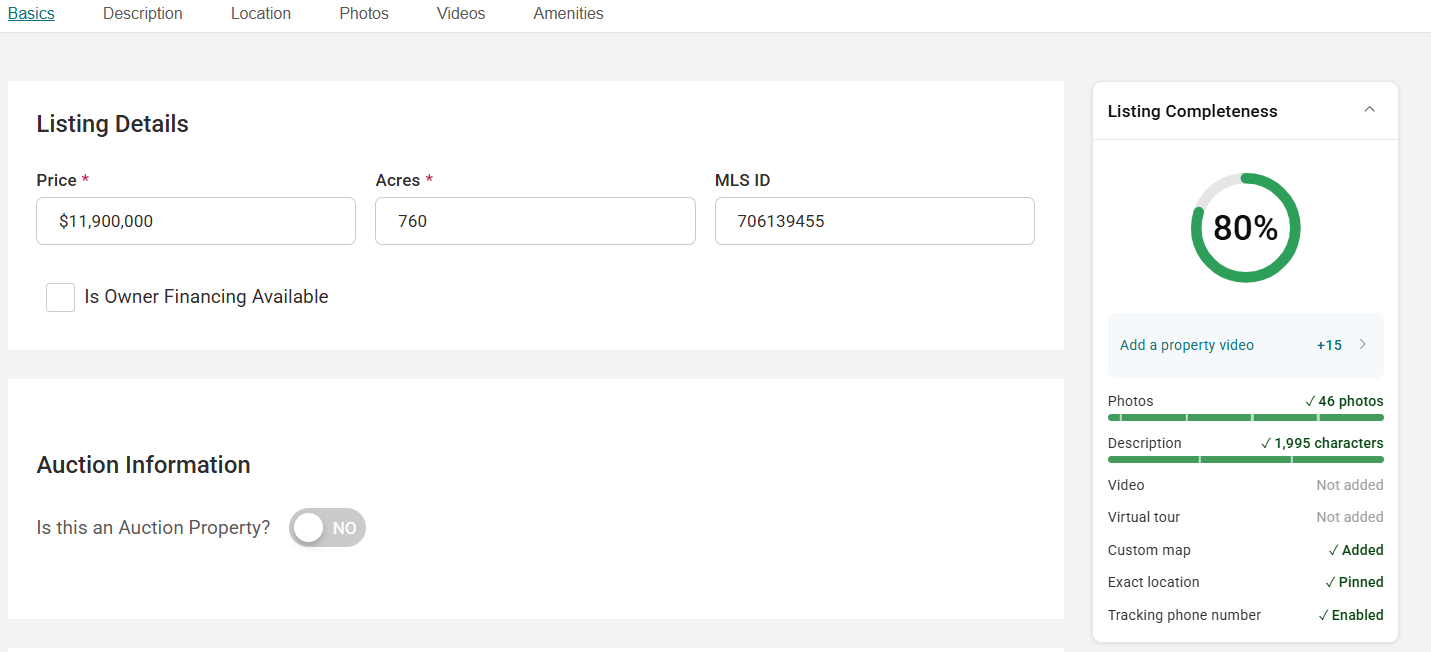
That’s why Marketing Hub includes a Listing Completeness Score, a simple content quality meter that measures how much of your property’s story you’ve told. The score is available on every listing and appears in your Marketing Hub Listing Manager and on each Listing Detail Page, where only you can see it. Buyers never see your score. It exists purely to help you build a stronger listing.
How the Score Works
The Listing Completeness Score rates your listing on a scale of 0 to 100. The score is based on factors we know help buyers evaluate properties, including:
- Photos. Strong photography is often the first thing a buyer notices.
- Property description. A detailed description helps buyers picture the land and its potential.
- Maps. A custom map shows buyers exactly what they’re looking at and where.
- Videos. A video tour gives buyers a feel for the property before they ever visit.
- Communication preferences. Setting these ensures interested buyers can reach you the way you prefer.
As you add recommended content, your score increases in real time. There’s no waiting period or refresh cycle. Upload new photos or expand your description, and you’ll see the change reflected immediately. A score of 100 means you’ve taken advantage of every content opportunity available for your listing.
Improving Your Score
The Listing Completeness Score is designed to be a guidance tool. In addition to showing your current score, Marketing Hub highlights opportunities to improve your listing by identifying missing content. You may see suggestions such as adding more photos, enhancing your property description, creating a custom map, or adding a video tour.
Think of these suggestions as a checklist for creating a stronger listing. Work through them one at a time and watch your score climb as you go. The more complete your listing is, the easier it is for buyers to understand the property’s features, weigh its potential, and decide whether to learn more.
What the Score Does and Does Not Represent
It’s important to understand what the score measures. The Listing Completeness Score reflects the quality and completeness of your listing content. It is not a search ranking score, and it does not determine where your property appears in search results. Likewise, a higher score does not guarantee leads or inquiries.
Instead, the score helps you answer one question: am I taking full advantage of the tools available to showcase this property? By following the recommendations provided and filling in key details, you can be confident you’re giving your property the best opportunity to make a strong first impression.
Frequently Asked Questions
Where do I find my Listing Completeness Score?
Your score appears in your Marketing Hub Listing Manager and Listing Detail Page. Every listing has its own score.
Can buyers see my score?
No. The score is visible only to you. It’s a private tool to help you improve your listing content.
How often does the score update?
Immediately. The score updates in real time as you add or improve content, so you can see the impact of each change right away.
What is a perfect score?
The maximum score is 100. Reaching it means your listing includes all of the recommended content types.
Does a higher score mean my listing ranks higher in search?
No. The score measures content completeness, not search placement. That said, complete listings give buyers more of what they need, which is always a good thing.
Is the score available on all listings?
Yes. Every listing in Marketing Hub includes a Listing Completeness Score, regardless of listing type.
Get Started in Marketing Hub
Ready to check your score? Log in to your Marketing Hub account and open your Listing Manager to see the Listing Completeness Score for each of your properties. From there, select any listing to view its Listing Detail Page, review your content suggestions, and start making improvements. For more tips on building stronger listings and getting the most out of your account, visit our Resources page.


